4 HDMI5 Component Video Switch
5HDMI5 Component Video Switch
Initial Setup...
Use t he H DMI conne ct ions to s witch HDM I si gnal s. Use the
digit al a udio conn ec tors to sw itch digi tal audi o si gnals,
with auto mati c convers ion bet ween the opti cal and coax
digit al a udio form ats.
If usin g a hardw ired IR co ntroll er to ope rate t he H DMI5 ,
conne ct the cont ro ller IR cabl e to the IR/ Z-I N ja c k .
If usin g a PC ( or o ther ser ial cont ro ller ), co nnec t it to the
RS- 232 jack usi ng a sta ndard ser ial cabl e.
Plug the power modu le i nto th e HD MI5, and plu g th e mo d-
ule into a st anda rd A.C . wa ll rece ptac le. The stan dby L ED
will lig ht up.
Selecting an Input...
To s w itch bet ween any o f th e fi ve inp uts, simp ly p re ss t he
butto n for the desi red i nput . I f th e HD MI5 is i n th e st andby
mode, it w ill tur n on . The H DMI5 wil l th en s witch to t he s e -
lec ted inpu t, a nd t he a ssoc iated LED s wi ll l ight to in dica te
this.
To p l ace the HDMI 5 ba ck i nto th e st andby mod e, pres s an d
relea se t he Power Togg le b utton . The chan nel LEDs wil l al l
go b lank , a nd t he s tand by LE D wil l li ght u p. Pres s the Power
Togg l e b u tton aga in to re -se lec t t he p revio usly sel ec ted
inpu t.
Audio / Video Breakaway...
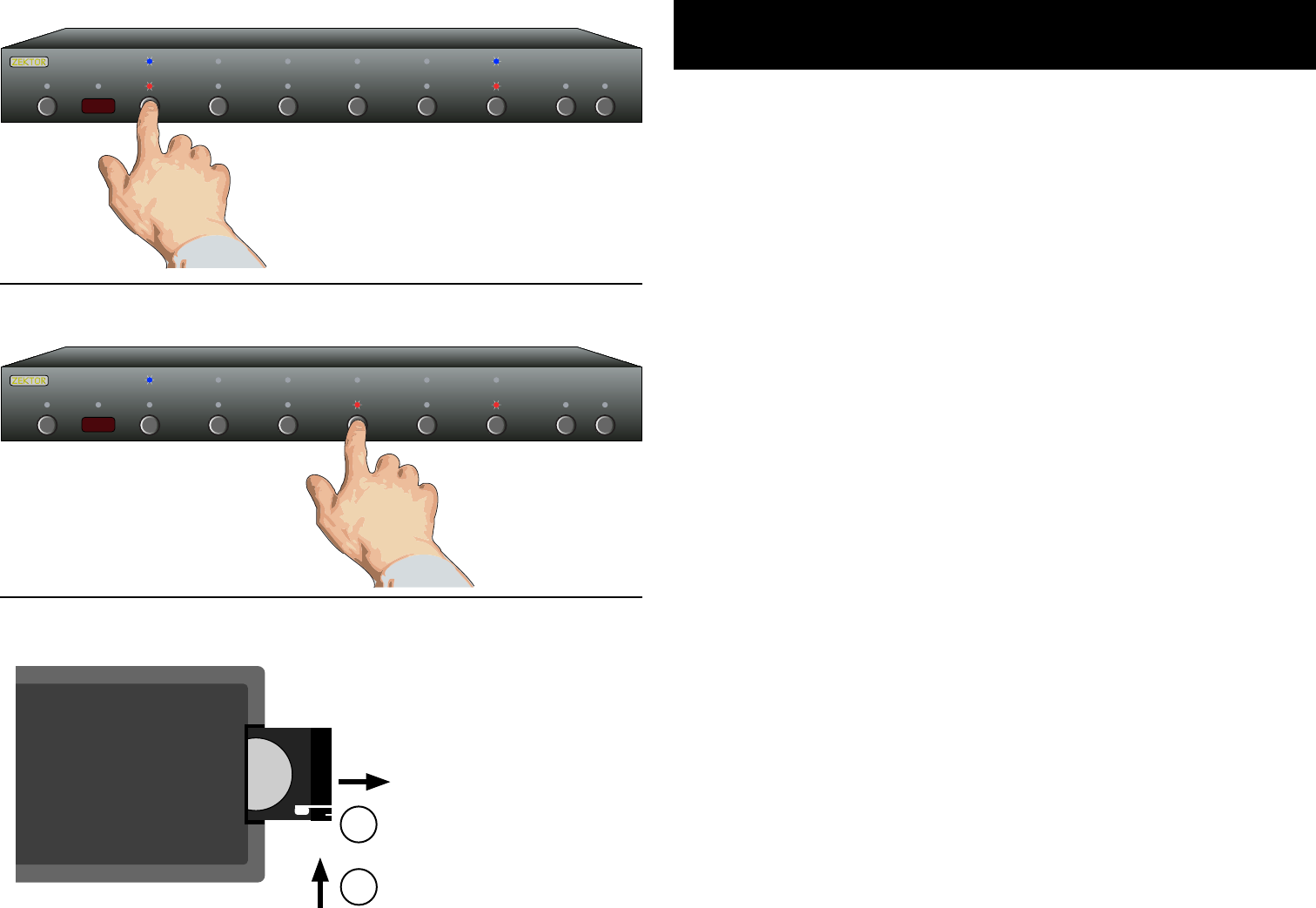
To b re ak away t he a udio or vide o (to lis ten to the digi tal au-
dio from one inpu t wh ile view ing vide o from ano ther ) pre ss
the SEL key. Wh en b oth the RED and BLUE L EDs above the
SEL butto n are lit , th en t he a udio and vid eo i nput s wi ll b e
switc hed simu ltan eous ly. Whe n on ly t he R ED L ED i s li t, t hen
only the Audio wil l be swi tched. Sim ilar ly, w hen only the
BLUE LED is l it, only the vid eo w ill be s witch ed w hen press -
ing an i nput but ton.
Note: Au dio break away on ly a ppli es to the dig ital aud io con -
nec tio ns o n th e ba ck o f th e HD MI5. You ca nnot brea k-
away the HDM I au dio chan nel that i s se nt over the HDMI
cab le. HDM I au dio will always fo llow the vide o si gnal.
•
•
•
•
•
•
•
Selecting an Input: Press numbered buttons to select an input.
Easy, Simple, Instructions!
Audio / Video Breakaway: Press SEL to toggle breakaway options.
Only red LED, above
the SEL button is lit,
so only Audio is
switched when
'4' is pressed.
Installing battery (view from back of remote)
To open: Press small tab
towards center...
1
2
...while pressing tab,
pull out battery holder.
Kommentare zu diesen Handbüchern